On 2026-10-11, vinhdata.com served a stranger’s gambling page from GitHub Pages, through DNS
records I had left behind. Removing the records stops it at once; verifying the domain on GitHub
stops it for good. Nobody had touched my Cloudflare account or my repositories.
Why it works#
GitHub Pages serves every custom apex domain from the same addresses, four IPv4 and four IPv6:
185.199.108.153    2606:50c0:8000::153
185.199.109.153    2606:50c0:8001::153
185.199.110.153    2606:50c0:8002::153
185.199.111.153    2606:50c0:8003::153
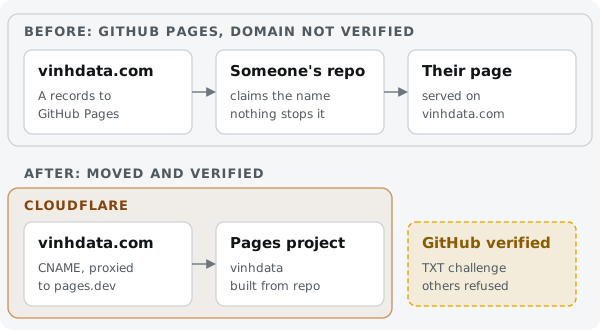
When a request arrives, GitHub looks at the host name and serves whichever Pages repository has claimed it. Claiming a name means typing it into a repository’s Pages settings; a name must be unique across GitHub Pages, but nothing checks DNS ownership unless the owner has verified the domain. Three conditions together hand a domain to anyone:
| Condition | My domain, until 2026-10-11 |
|---|---|
| DNS points at GitHub Pages | four apex A records to the IPv4 addresses above, left from an earlier plan |
| no Pages site of the owner claims the name | the site never went live on GitHub Pages |
| the domain is not verified on the owner’s GitHub account | not verified |
Takeovers like this are common enough that GitHub documents them and recommends verifying a domain before you even add it to a repository.
Check your domains#
Ask the domain who answers. On 2026-10-11, before the fix, mine said:
$ curl -sI https://vinhdata.com/ | grep -iE '^(HTTP|server)'
HTTP/2 200
server: GitHub.com
That worked because the stranger’s site had a certificate for the name. On a name nobody has
claimed, GitHub presents its *.github.io certificate and curl stops at the TLS error, so check
over plain HTTP too, headers and body:
curl -si http://<your-domain>/ | grep -iE '^(HTTP|server)|GitHub Pages site'.
| You see | Meaning |
|---|---|
server: GitHub.com and a page you did not publish | someone else’s repository has the name: taken over |
over http://: server: GitHub.com, 404, body “There isn’t a GitHub Pages site here” | dangling: nobody has claimed it yet, anyone can |
over https://, a certificate error for *.github.io | also dangling |
server: cloudflare | the record is proxied; the header cannot tell you, read the zone |
| the host you expect | fine |
Then read the zone itself: any A record with the IPv4 addresses above, any AAAA record with the
IPv6 ones, or any CNAME to *.github.io must belong to a Pages site you run. The same goes for
every record that points at a hosted service: a CNAME to a deleted bucket, a retired app or an old
project is the same problem under another name.
Close it#
- Remove the dangling records. I deleted the four A records and the
wwwCNAME that pointed at the apex. The stranger’s page was gone within a minute, and so was my domain, until the real site went live on Cloudflare Pages later that evening. - Verify the domain on GitHub. In your profile Settings, not the repository’s: Pages →
Add a domain. GitHub shows a TXT record named
_github-pages-challenge-<user>; add it, wait until it resolves, press Verify. Verification also releases the domain from any other account’s site at once, and from then on only your repositories can publish to it. Keep the TXT record.
Clean up#
- Report the repository through GitHub’s abuse report form.
A site published from a branch keeps a
CNAMEfile with your domain, so GitHub code search may find it, but code search covers default branches only. A site deployed through Actions needs no such file. When search finds nothing, only GitHub can tell you. - Check search results. Search
site:<your-domain>. Search Console’s Removals tool hides a URL for about six months; the URL drops out for good once Google recrawls it and gets a 404, which is what the stranger’s pages now return. - Point the domain at the real site. For this one, part 1.
What to check#
curl -sIon the apex andwww: theserverheader is the host you expect.- No A, AAAA or CNAME record in the zone points at something you no longer run.
- Domains you own are verified on GitHub, whether or not you use GitHub Pages today.
- The verification TXT record is still in the zone.
Sources#
Checked 2026-10-12.